
The Driver Update That Wrecked My Podcasting Setup
Yay, Windows! If you’re using it regularly, you’ve probably been having the suspicion for decades now that Microsoft hasn’t been prioritising consumer users of their operating system. Using Windows on a daily basis has become a very annoying experience. While this decline in the quality of Microsoft’s products is by no means limited to Windows, it is most noticeable there. And it has definitely accelerated since Microsoft has been bragging about using AI to write their code.
And despite how horrible it is to use sometimes, many of us persevere and use Windows every day. Simply because many important applications — that we might have invested a lot of money in through plugins and other purchases — still do not run, or do not run very well, on Linux. Or because we need to run Windows on a daily basis to work efficiently with co-workers, employers and clients.
And so, even someone like me, who was at one time one of the most well-known Linux podcasters, is using Windows a lot. I even use it quite often to record my current podcast, Punching Upwards. Simply because if I’m sitting on Windows all day anyway, I might as well use it to keep working instead of rebooting or switching machines. It’s not like I generally hate Windows. I started my computing journey on DOS and graduated to using Windows full-time with Windows 3.11, so I’ve used it a lot over the years and I always enjoyed its original DIY ethos that allows you to run whatever software you personally want to run in whatever way you prefer.
What’s pissing me off is how bad Windows has gotten. Case in point: A few weeks ago, at the beginning of June, Windows completely broke my ability to record podcasts by bricking my professional USB audio interface setup. I’m sitting down to describe it here for two reasons: To explain how bad things have gotten at Microsoft and to show how I fixed the problem, in case someone runs into the same issue.
Microsoft AudioProcessingObject Driver Update 1.0.3.56670
In May, Microsoft released a patch through Windows update entitled Microsoft Corporation AudioProcessingObject Driver Update (1.0.3.56670). This was targeted at Windows 11 versions 24H2, 25H2 and the ARM-exclusive version 26H1. I myself am running Windows 11 Pro 24H2. As far as I can tell, this update was installed as a driver update for the sound card hardware that is installed in my motherboard. My system uses a B550 Aorus Elite V2 motherboard with a Realtek ALC1200 sound chip. Even though many sources qualify this as an “optional update”, I was never asked about this and the update was installed on my system automatically.1
This update is not really a sound driver update, though. It installs a kernel-level audio processing layer (APO) that sits between the hardware driver and other parts of the operating system. This introduced a feature called “Voice Clarity” that is supposed to improve the audio coming from your microphone and going to VoIP apps like Skype and Microsoft Teams. As far as I can tell, it does some AI / machine learning bullshit to spruce up voice quality for people that are using shitty microphones like those made by random cheap Chinese manufacturers, Blue or the bad mics built into almost all laptops and headsets.
The first issue with this update is the audio degradation many users of such audio devices have reported. So instead of introducing clarity, this update actually introduces delay, dropouts, artefacting and other audio degradation for some users. Some even reported issues with audio jack inputs in their motherboard being disabled and boot issues with Windows after the update was installed.
There is a second issue with this update, however, that is much worse. It seems to affect users with external sound cards — both those directly installed on the motherboard and those attached externally, via USB for example.
Error 0x88890008: Sample format not supported
I have been using a Focusrite Scarlett 2i4 (2nd Generation) USB audio interface for years. This acts as a preamp and monitoring device for my Heil PR 40 as well as my audio output whenever I use headphones on my computer — when recording and mixing podcasts as well as in other usage scenarios like streaming, video calls or playing video games. This audio interface has seen daily use and has been rock solid since I bought it almost a decade ago.
But one day early this June, I started up Hindenburg, which I use to record my podcast, and it greeted me with the following error message:
Audio: Failed to initialize (0x88890008: Sample format not supported).
This usually means that the sample rate for the audio format that your software uses to stream to and from your sound card is set wrong. Since Hindenburg only uses my Scarlett 2i4, I knew which audio device must be affected. And indeed, this USB audio interface could neither record nor play back anything. It was completely inoperable from Windows’ point of view. I checked the device settings and the Hindenburg settings, compared them, and was sure they were set correctly — I had not changed them, I was sure of that. Still, my audio interface was now unusable.
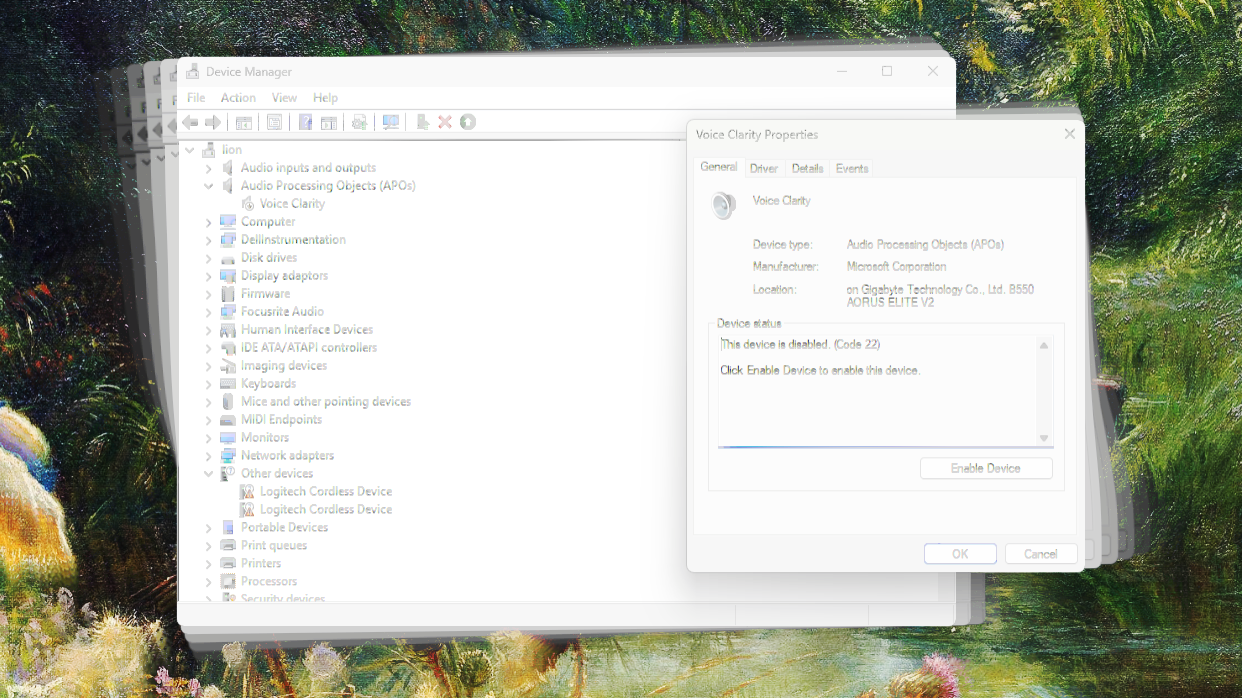
After over an hour of research — keeping me from recording my podcast, which is on a strict deadline — I finally figured out where the problem might be coming from. While verifying that the Scarlett driver was up-to-date and working correctly, I had found a new entry in my Device Manager. A new device group named Audio Processing Objects (APOs) had appeared and listed a single device: Voice Clarity. Searching for what this was online, I found references to the aforementioned Microsoft Corporation AudioProcessingObject Driver Update (1.0.3.56670). This led me to relatively fresh posts of people reporting issues with it, some to do with external sound cards, and posts of users trying to uninstall it.
I first made sure via the history function in Windows Update that the aforementioned update had indeed been installed on my system prior to the last reboot, all but confirming that this was the culprit. I then tried to disable the Voice Clarity driver via the Device Manager, but my Scarlett 2i4 still would not work. When I uninstalled that driver, it would just be re-installed immediately upon rebooting Windows. Restoring Windows to a point prior to the offending update being installed might work, but it wasn’t an option in my case and I had no idea how to prevent Windows Update from re-installing the driver anyway — as it had installed it without my consent or being configured to do so in the first place.
The Solution
The solution I found that worked for me, and continues working to this day, is the following: I selected the Voice Clarity entry in the Device Manager and in the Driver tab selected Uninstall Device. In the confirmation dialog, I checked the box Attempt to remove the driver for this device. Before rebooting the system, I opened PowerShell with Administrator privileges and ran the following command: pnputil /enum-drivers
This will list an AudioProcessingObject by the provider Microsoft Corporation in there somewhere in the output. On my system the driver was named voiceclarityep_audio_component.inf. The Published Name of this driver will be something like oemXX.inf where the XX is a two-digit number. This is probably different on every system; on mine it was named oem44.inf. Now you want to completely remove this plug & play driver and prevent it from being reinstalled when Windows boots.
To completely remove the driver from Windows Driver Store and prohibit automatic installation, execute the following command in PowerShell with Administrator privileges:
pnputil /delete-driver oemXX.inf /uninstall /force
In this command, the XX corresponds to the actual digits in the Published Name you found out in the preceding step.
Reboot and see if this worked for you. For me, it disabled the Voice Clarity entry in the Device Manager and allowed me to use my external sound card again. This means, of course, that I don’t benefit from Microsoft’s amazing automatic voice quality improvements, but I don’t want AI to mess with my microphone input anyway, since I have a studio-level microphone, professional audio interface and know what I am doing after twenty years of making podcasts … thank you very much!
If pnputil does not work for you, you can also manually delete the offending driver from the Windows Driver Store. To do this, navigate to C:\Windows\System32\DriverStore\FileRepository and find its folder. On my system, this is called voiceclarityep_audio_component.inf_amd64_5a6ea83e80379bce. This should include the oemXX.inf file you’ve identified. You can delete this manually, if the previous step didn’t work.
On managed systems, you might want to create a Group Policy to prevent Windows Update from installing any updates named Microsoft Corporation AudioProcessingObject Driver Update in the first place. How to do this is outside the scope of this article, however. This Quora post on permanently uninstalling devices from the Device Manager provides some helpful pointers, though.
In Closing
To recap: Microsoft pushed an “optional update” on my system automatically and thus broke my professional-level external audio interface, leading me to spent about two hours to fix the issue and delaying the podcast I wanted to record deep into the night. I was very close to switching to my Linux machine to record the show, but was also driven by an intrinsic desire to figure out what the hell is going on with my computer — a desire that I’ve been driven by since getting my first IBM-compatible PC in 1989.
I did figure it out in the end, but the whole journey was hella annoying and a nice example of how Windows is now getting worse in some way with almost every single update. If Microsoft can’t turn this ship around soon, they will finally be in a position where this actually hurts them and they actually lose a significant amount of market share. What Linux on the desktop couldn’t accomplish, they will be doing to themselves, simply by pushing unwanted so-called “features” on people that help Microsoft and its partners more than their customers, and by fucking up their own code with AI. It’s bad enough that they are stuffing Copilot into every part of their operating system, their applications and their web search, the thing is now also actively at work destroying the Windows codebase.
I see people complaining about this stupid shit on social media, in podcasts and in YouTube videos almost every single day. And I get why. Shit like this ordeal is absolutely unacceptable.
Jeronomy supported this article on Ko-Fi:
As the finder of
pnputil /enum-drivers | grep "the broken clarity APO driver nonsense" | grrrrrrr | do-i-own-this-or-it-me | reflect-life-choices
pnputil /delete-driver oem128.inf /uninstall /force
I owe you a coffee.